
Download EveryAIImage – AI Image Generator, Photo Gallery & Search Tool
Introduction
In the fast‑evolving world of AI‑driven visual creation, creators constantly search for a single platform that can both inspire and deliver finished assets without juggling multiple tools. EveryAIImage answers that call by merging a high‑quality text‑to‑image generator with a massive, searchable gallery of pre‑generated visuals. Whether you are a freelance designer looking for quick mood‑board material, a marketer needing fresh ad concepts, or a developer wanting to embed AI art directly into an application, this web‑based service offers a seamless blend of creativity and convenience.
The platform operates entirely in the cloud, meaning there is no heavy software to install, and it supports a progressive web‑app (PWA) mode that lets you launch it from your desktop or mobile home screen just like a native app. With a free tier that lets you experiment and a reasonably priced Unlimited plan that removes daily caps, EveryAIImage positions itself as a versatile, cost‑effective solution for anyone who needs AI‑generated imagery on demand. In the sections that follow, we will explore the core capabilities, walk through the step‑by‑step usage process, and weigh the pros and cons so you can decide whether this tool fits your workflow.
Overview
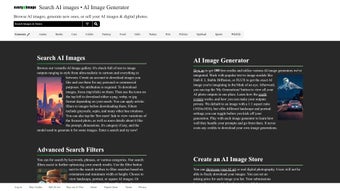
EveryAIImage is a cloud‑hosted AI image generation and discovery platform that brings together two complementary experiences: an on‑the‑fly text‑to‑image engine powered by industry‑leading models such as DALL‑E 3, and a curated gallery containing thousands of AI‑crafted images across diverse categories like anime, celebrity portraits, abstract art, product mock‑ups, and more. The service emphasizes instant accessibility—users can type a natural‑language prompt, select a model, and receive a set of four variations within seconds. For those who prefer to browse rather than generate, the searchable gallery offers filters by style, popularity, and newest additions, allowing rapid discovery of ready‑to‑use assets.
Each image comes with comprehensive metadata, including licensing terms, resolution details, and optional variation slots. While the free account imposes a modest daily generation limit to prevent abuse, the Unlimited subscription eliminates those constraints, unlocks bulk‑download tools, and provides high‑resolution output suitable for professional print or large‑scale digital campaigns. Security is baked in through SSL encryption and trusted payment gateways, ensuring that both personal data and financial transactions remain protected.
Overall, EveryAIImage aims to be a one‑stop shop that reduces the time and effort traditionally spent switching between separate AI generators, stock libraries, and licensing platforms.
Key Features and How to Use EveryAIImage
Feature Highlights
- AI Photo Gallery – Browse thousands of AI‑created images sorted by category, popularity, and newest additions.
- Text‑to‑Image Generator – Powered by DALL‑E 3 and other leading models; generate unique visuals from any natural‑language prompt.
- Image Ranking & Collections – Save favorites, rank them, and build custom collections for quick retrieval.
- Unlimited Access Plan – Remove daily caps, enjoy bulk downloads, and access high‑resolution assets.
- One‑Click Purchase – Buy single images without creating an account; receive full licensing details instantly.
- Variation Engine – Get up to three AI‑generated variations of a purchased image to match exact creative needs.
- Category Diversity – Includes anime, celebrity likenesses, abstract concepts, product mock‑ups, and more.
- Responsive Web App – Works smoothly on desktop browsers and mobile devices, adapting to any screen size.
- Secure Payments – Integrated SSL encryption and trusted payment gateways protect user transactions.
- API Ready – Developers can integrate the search and generation endpoints into their own applications via RESTful calls.
Step‑by‑Step Usage Guide
- Open the Platform: Navigate to everyaiimage.com using any modern browser (Chrome, Edge, Firefox, Safari). For a native‑like experience, click the “Install” button in the address bar to add the PWA to your desktop or mobile home screen.
- Enter a Prompt: In the central input field, type a descriptive sentence. The AI recognises style cues (e.g., “cinematic lighting”, “watercolor”, “low‑poly”), subject details, and even mood descriptors.
- Select a Model: Choose DALL‑E 3 or an alternative model from the dropdown. Each model has unique artistic tendencies, allowing you to tailor output to your project’s aesthetic.
- Generate & Review: Click “Generate”. Within a few seconds, four variations appear in a grid. Hover to enlarge; click “Save” to add any version to your personal collection.
- Purchase (If Needed): For high‑resolution or commercial use, hit “Buy Now”. You’ll receive an instant download link, a licensing PDF, and the option to request up to three additional variations.
- Download & Implement: Choose PNG (lossless) or JPEG (compressed) format, download the file, and incorporate it into your design, website, video, or any other medium covered by the license.
- Leverage the API (Paid Users): Access the developer portal, generate an API key, and start making RESTful calls to automate image generation or integrate search results directly into your own applications.
Pros and Cons
- Pros:
- Vast, searchable gallery of AI‑generated images.
- High‑quality output from DALL‑E 3 and comparable models.
- No account required for single‑image purchases.
- Unlimited plan removes caps and adds bulk‑download capabilities.
- Responsive design works on desktops, tablets, and phones.
- API access for developers enables automation.
- Cons:
- Free tier limited to a few generations per day.
- Advanced features (API, bulk download) require a paid subscription.
- Image variations limited to three per purchase.
- License terms require attribution for certain commercial uses.
Operating System Compatibility
EveryAIImage runs on any operating system that supports a modern web browser, including Windows 10/11, macOS Ventura and later, major Linux distributions, Android 10+, and iOS 14+. The PWA works natively on Android and iOS, offering offline caching of previously viewed images (generation still needs an internet connection).
Frequently Asked Questions
Can I use the generated images for commercial projects?
Yes. EveryAIImage provides a commercial‑ready license with each purchase. The license outlines usage rights, attribution (if required), and any resale restrictions.
Is there an API for developers?
A RESTful API is available to paid subscribers. It allows programmatic image generation, search, and retrieval of metadata, making it easy to embed AI visuals directly into apps or websites.
How does the “Unlimited” plan work?
The Unlimited plan removes daily generation caps, unlocks high‑resolution downloads, and adds bulk‑download tools. It is billed monthly or annually at a discounted rate.
Do I need to create an account to purchase images?
No. EveryAIImage allows one‑click purchases without registration. However, creating an account lets you store collections, track purchases, and receive updates.
What file formats are available after purchase?
Images are delivered in PNG (lossless) and JPEG (compressed) formats. You can choose the preferred format during checkout.
Conclusion & Call to Action
EveryAIImage distinguishes itself in a crowded AI‑art market by offering a unified environment where generation, discovery, and licensing coexist seamlessly. The cloud‑only architecture eliminates the need for heavy installations, while the optional PWA gives the feel of a native app on both desktop and mobile devices. For casual users, the free tier provides enough juice to experiment and gauge the quality of the output.
Professionals, on the other hand, will appreciate the Unlimited plan’s removal of daily caps, the availability of high‑resolution files, and the API that streamlines bulk workflows. Although the free version’s daily limits may feel restrictive for power users, the pricing of the subscription is competitive when compared with purchasing individual stock images or maintaining multiple AI accounts. If you are looking for a reliable, secure, and up‑to‑date source of AI‑generated visuals—whether for marketing campaigns, game assets, presentations, or personal projects—EveryAIImage delivers a compelling package.
Ready to transform your creative process? Visit the official site, try the free generation limit, and consider upgrading to the Unlimited plan for uninterrupted, professional‑grade access.



.png)



